
- Parents & Students
-
-
Parent Resources
- Career Programs and Dual Credit
- Child Care Programs
- Curriculum
- District Calendars
- District Contacts Directory
- Early Learning Programs
- Homeschooling Requirement
- Inclusive Learning Support
- Kindergarten Registration
- MyEdBC Login
- Parent Advisory Council
- Transportation Registration
- Student Insurance
- Student Registration
- Transportation
- Winter Weather Information
- Welcome to the 2026-2027 School Year!
- CV Mental Health and Digital Safety Resources
Student Resources
- Provincial Assessments
- Career Programs and Dual Credit
- Digital Resources
- District Moodle
- e-FSA Login
- Erase
- Graduation Assessments
- MyEdBC Login
- Online Course Selection
- Reset Office 365 Passwords
- Resources
- Scholarships
- Student Literacy and Numeracy Dashboard
- Student Learning Survey
- Safe, Caring, Inclusive Schools (Anti Racism and SOGI)
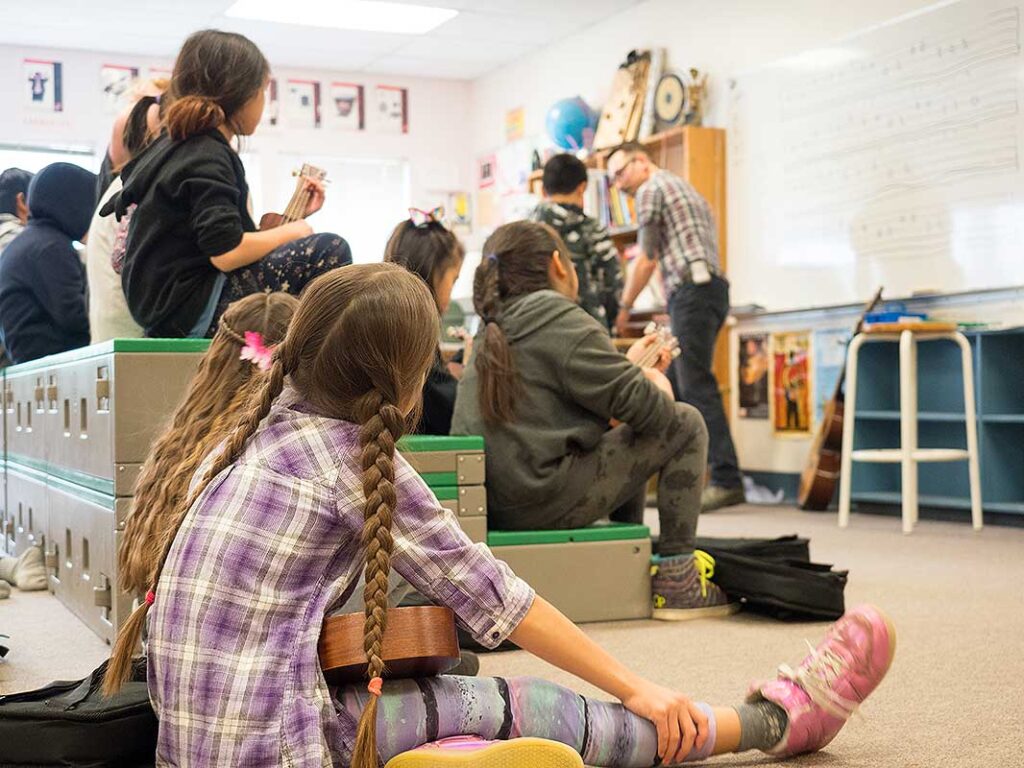
District Parent Advisory Council
- Chair: Keirsten Tymko
- Email: cowichanvalleydpac@sd79.bc.ca
- Website: dpac.sd79.bc.ca
-
-
- Employment
-
-
Employment Opportunities
Join the Cowichan Valley School District and have the career you want that supports the life you have.
-
-
- Contact Us
-
-
Welcome to Cowichan Valley School District
The Cowichan Valley School District proudly serves learners across many diverse communities. We offer world-class instruction and a rich diversity of engaging programs to help prepare our learners for a world they will create.
Contact District
Phone: (250) 748-0321
Fax: (250) 748-6591
Email: info@sd79.bc.caMailing Address
- 2557 Beverly Street
Duncan, British Columbia
V9L 2X3
- 2557 Beverly Street
-
-
- Schools
-
-
Welcome to Cowichan Valley School District
There are 17 Elementary schools and 5 Secondary schools in the Cowichan Valley School District.
Catchment School
To learn what your catchment school is and to obtain school contact info please use the School Locator tool.

Framework for Enhancing Student Learning (FESL)
Each school has their own plan on how to serve our learners. These plans align with the district-wide FESL and Beyond Education, you can find individual school FESL’s with the below
-
-
- News
-
- Calendars
-
-
View 2024-2027 School Calendars
- 2024/25 School Calendar – finalized (the non-instructional and professional development days have been confirmed) and includes Early Dismissal days. Early Dismissal days added for PLCs.
- 2025/26 School Calendar – finalized (the non-instructional and professional development days have been confirmed) and includes Early Dismissal days. Early Dismissal days added for PLCs.
- 2026/27 School Calendar – finalized (the non-instructional and professional development days have been confirmed) and includes Early Dismissal days. Early Dismissal days added for PLCs.
- School Calendar Holiday Breaks (2024/25 to 2026/27)
Frequently Asked Questions
Do you have questions about how the school calendars are created? Please read our Frequently Asked Questions.
-
-


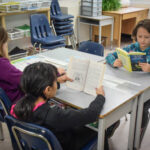



Tutorial – Student first time login with Mac
It’s back to school season!
That means a busy time for our staff & students. Check out our quick video guide on getting logged in the right way – and some quality of life features and changes we’ve made to our school Mac devices this fall.
What is Shared device mode?
Learn about Shared iPad mode and how you can get the most out of it in your classroom.
How to Sign In
Best practices for signing in your students to the iPad.
What’s a passcode?
Okay, the student’s signed in and now they need to make a passcode? We explain the logic and simplicity with this concept.
Saving student work
After your students have signed in, now it’s time to get to work and save it to their OneDrive.
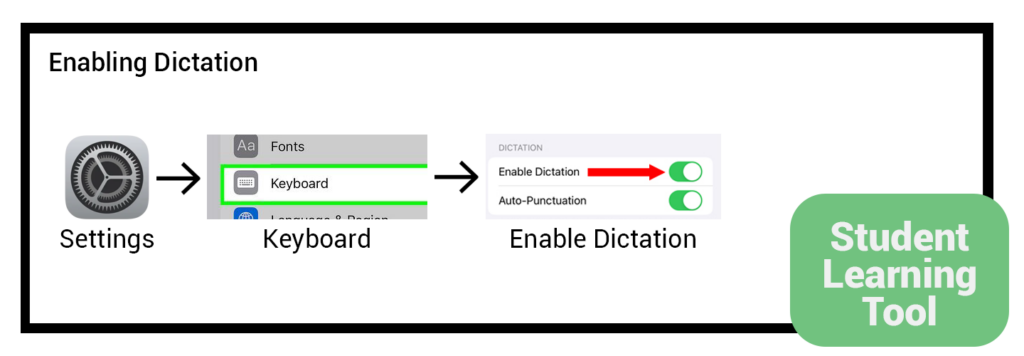
Dictate text instead of typing
You can dictate text instead of typing it on the on-screen keyboard.
Link to detailed walkthrough
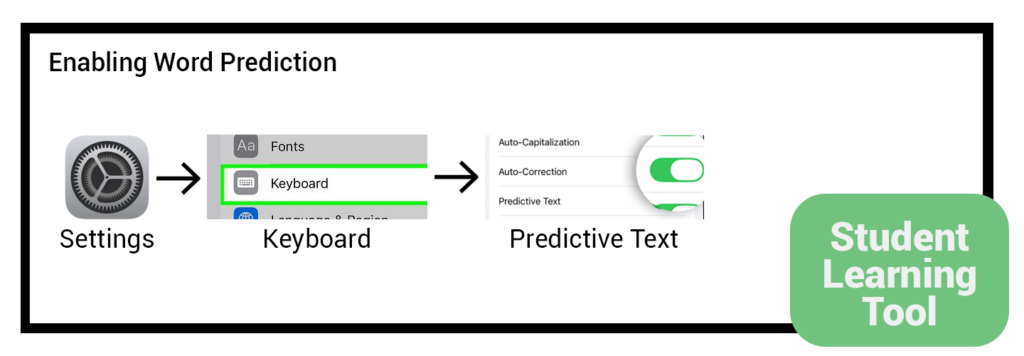
Have iPad predict text for you
Suggested words will display above the on-screen keyboard to assist in typing.
Link to detailed walkthrough
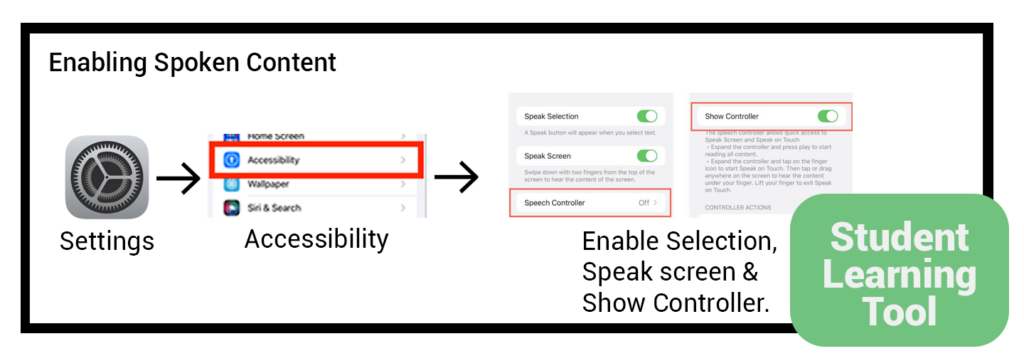
Have iPad read text out loud
Selected text will be automatically be read out loud (this works on websites, ebooks, etc)
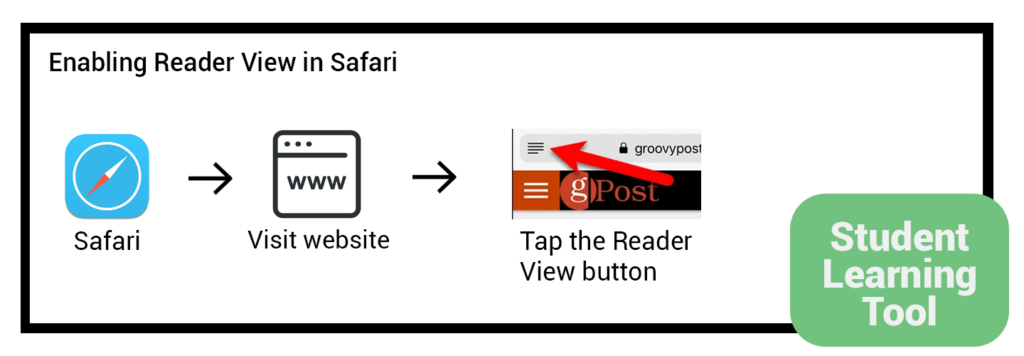
Reader View
Helps focus readers by hiding distractions such as ads on the website.
Link to detailed walkthrough
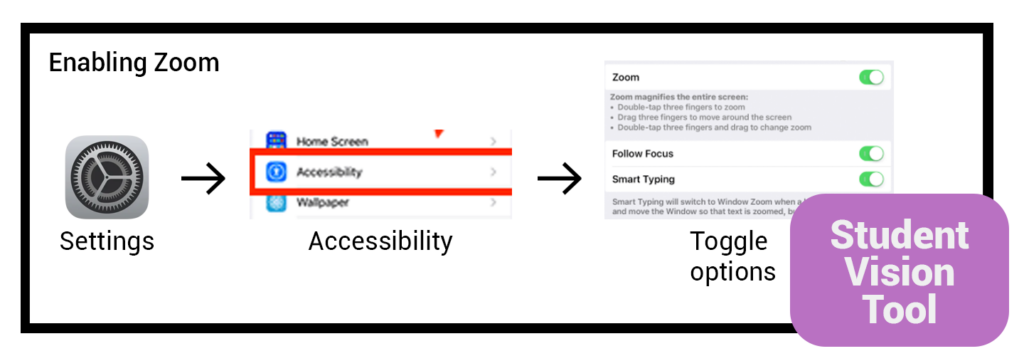
Zooming in & out
Allows you to zoom in & out on specific items
(eg: double tap or pinch to look closer at something)
Link to detailed walkthrough
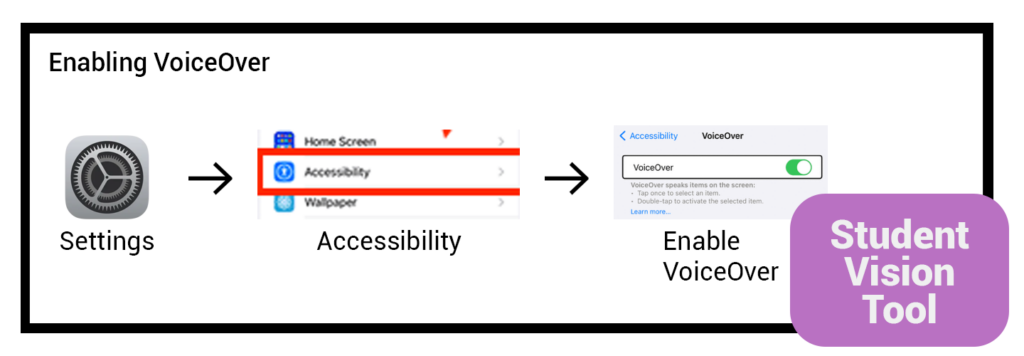
Have VoiceOver assist in navigating your iPad
Have the built-in screen reader speak what’s on the screen. Navigate your iPad with gestures, or with a connected keyboard or braille display.
Link to detailed walkthrough
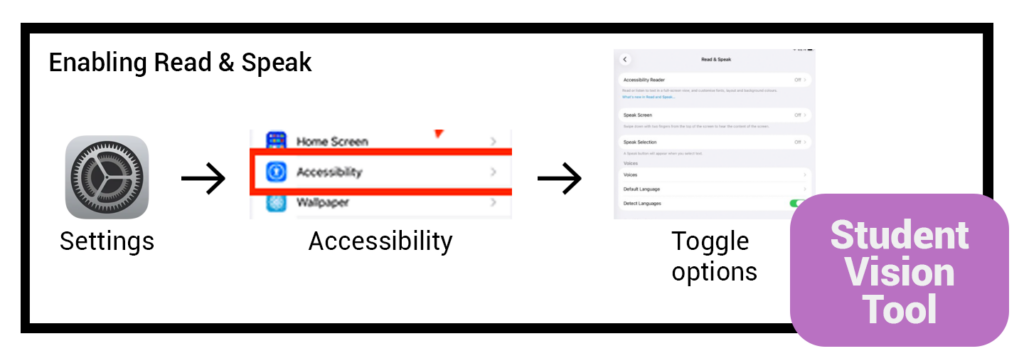
Have iPad read selected text aloud
Even if VoiceOver is off, have iPad read all text on the screen, what you’re typing, and more.
Link to detailed walkthrough
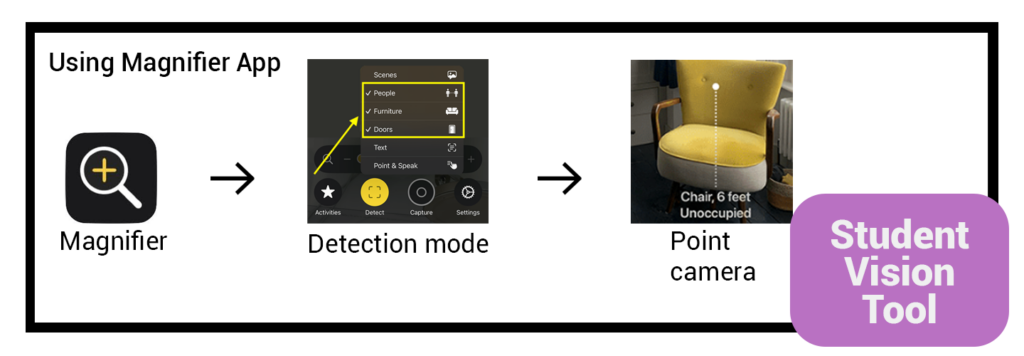
Get live descriptions of your surroundings
Use iPad as a magnifying glass and get live descriptions of your surroundings.
Link to detailed walkthrough
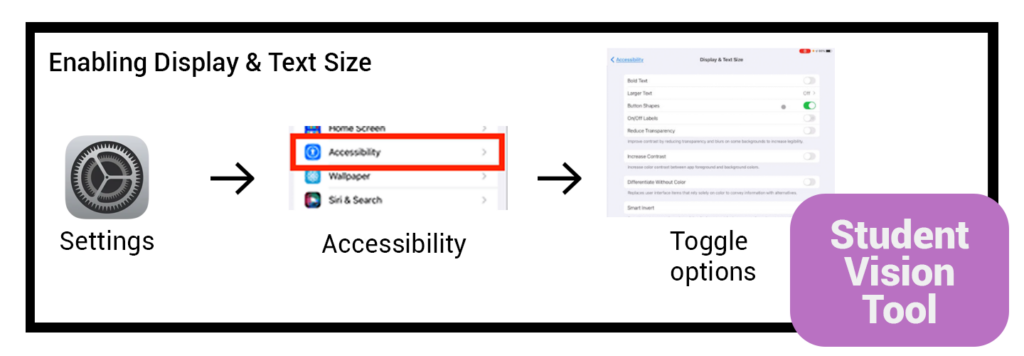
Make Text Bigger or Smaller
Adjust the reading size for text across iPad apps and system features.
Link to detailed walkthrough
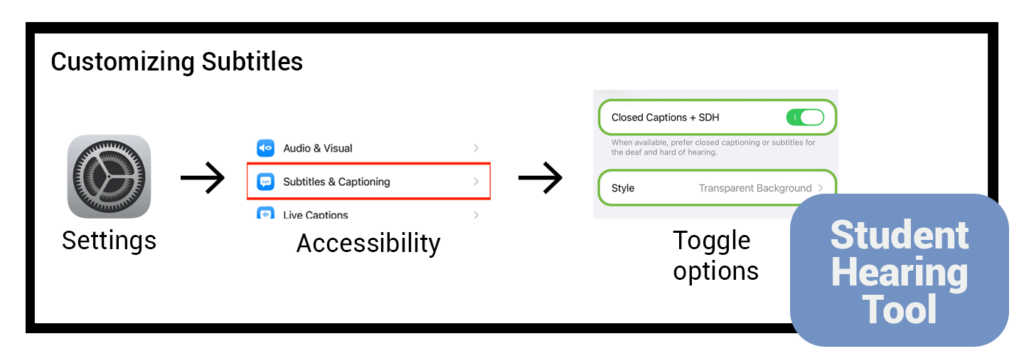
Enabling Subtitles
Change how subtitles look. Or instead of standard subtitles,
use closed captions and SDH when available.
Link to detailed walkthrough
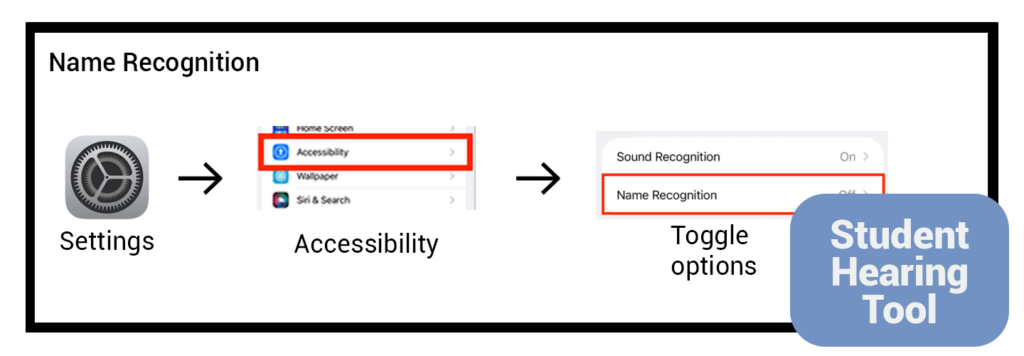
Name Recognition
With Name Recognition, have iPad listen for your name and alert you when it recognizes it.
Link to detailed walkthrough
This is coming soon. Stay tuned.
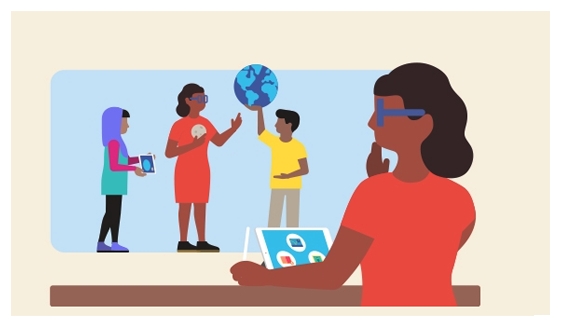
Apple Education
Apple Teacher is a free professional learning program designed to support and celebrate educators using Apple products for teaching and learning. Your self-paced journey starts by learning foundational skills on iPad and Mac, and continues as you integrate Apple technology into your everyday lessons. With three recognitions to explore, there’s endless inspiration and opportunity to be rewarded for doing your very best teaching — teaching that gives students more connected, creative, collaborative, and personal learning experiences.

Microsoft Learn
Dive deep into learning with interactive lessons, earn professional development hours, acquire certifications and find programs that help meet your goals. Explore a collection of resources for educators – quick start guides, infographics, and research studies to empower the education community.
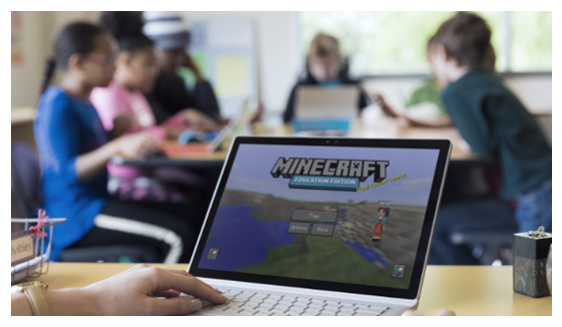
Minecraft for Education
Bring the magic of Minecraft into your learning environment! Connect your students’ passion to purpose and empower them with the skills to thrive in school and beyond. Explore hundreds of ready-to-use lessons and immersive worlds in our Library. From standards-aligned curriculum to creative build challenges, discover new ways to motivate game-changing learning!
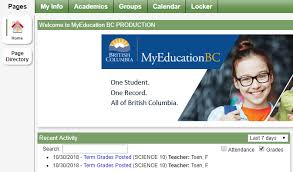
MyEducationBC.info
This webpage contains resources for Teachers around MyEducationBC, including quick start videos, reference cards, good practice guides and more.
https://www.myeducationbc.info/resources/teachers/
| Status | App Name | Usage guidelines |
| Approved | ABC Ninja | Click to view PDF |
| Not Approved | About my day | Click to view PDF |
| Approved | Alphablocks – Letter fun | Click to see PDF |
| Approved | Articulation Station | Click to see PDF |
| Approved | Baby Keyboard | Click to see PDF |
| Approved | Boddle | Click to see PDF |
| Approved | Book Creator | Click to see PDF |
| Approved | Brave Browser | Click to see PDF |
| Approved | Bugs and Buttons | Click to see PDF |
| Approved | Cash Register Express | Click to see PDF |
| Approved | Children Soundboard | Click to see PDF |
| Approved | Claro PDF Pro | Click to see PDF |
| Approved | Class Solver | Click to see PDF |
| Approved | Clock AAC | Click to see PDF |
| Approved | Cosmic Curve | Click to see PDF |
| Approved | Duolingo | Click to see PDF |
| Approved | Easy Reader Dolphin | Click to see PDF |
| Approved | EdPuzzle | Click to see PDF |
| Approved | Explain Everything | Click to see PDF |
| Approved | Glow Doodle | Click to see PDF |
| Approved | Gradekeeper | Click to see PDF |
| Approved | Inspiration Maps | Click to see PDF |
| Approved | iWriteWords | Click to see PDF |
| Approved | IXL Math & English | Click to see PDF |
| Approved | Jolly Phonics Songs | Click to see PDF |
| Approved | Jurassic World the Game | Click to see PDF |
| Approved | Lexia Core | Click to see PDF |
| Approved | Magic Fluids Flite | Click to see PDF |
| Approved | Prizmo Go | Click to see PDF |
| Approved | Prodigy | Click to see PDF |
| Not approved | Ready & Write for Mac | Click to see PDF |
| Approved | Reading.com | Click to see PDF |
| Approved | See Sign | Click to see PDF |
| Approved | Social Learning Platform | Click to see PDF |
| Approved | Sound Board Comic Effects | Click to see PDF |
| Approved | Spotify | Click to see PDF |
| Approved | TestNAV Aimsweb | Click to see PDF |
| Approved | Trailmark | Click to see PDF |
| Approved | Typing club | Click to see PDF |
| Approved | VEXCode IQ | Click to see PDF |
| Approved | Visual Timer | Click to see PDF |
| Approved | Writing Wizard School Ed | Click to see PDF |
Microsoft 365 Learning Resources
The Cowichan Valley School District exclusively uses Microsoft 365 (M365) as its core digital toolset, establishing a unified ecosystem for communication, collaboration, and learning across all schools.
To help staff make the most of this platform, our team has built an extensive library of tutorials, guides, and best practices tailored specifically for educators and support staff.
OneDrive
We have curated collection of walkthroughs to get you started with OneDrive and help you get the most from it.

Copilot Chat
Getting started with Artificial Intelligence at work and in the classroom.

Sharepoint
Need to collaborate with two or more colleagues? We provide a deep-dive on all things Sharepoint.

Teams
Create the digital classroom of your dreams.
Coming soon
Popular Articles
Cybersecurity Resources

Cybersecurity in Education
To protect school networks and student data, good cyber hygiene relies on simple, daily habits. Ultimately, the most powerful defence is when everyone’s working together towards creating a safe, defensible security approach.
Ready to learn more? Let’s go.
iPad Learning Resources
iPads in the Classroom
Take your lesson plans farther with these curated walkthroughs & videos on everything from signing in to using Apple Classroom.